If you run a business, work as a freelancer, or even manage a community group, you know how important quick communication is.
Many times, customers want to message you on WhatsApp, but they hesitate because they must first save your number. That's where WhatsApp link generation becomes a game-changer.
With a WhatsApp link, people can click once and start chatting with you instantly: no need to save your contact.
In this article, you will learn what WhatsApp link generation is, how to create one instantly using WAppChat, and why it is a must-have tool for anyone who uses WhatsApp for work or personal connections.
What is a WhatsApp Link Generator? #
A WhatsApp link generator is a tool that creates a clickable link in this format:
https://wa.me/
?text=
When someone clicks this link:
- They are taken directly to a WhatsApp chat with you.
- The pre-filled message (if added) appears in the text box.
Example:
https://wa.me/15551234567?text=Hi%20I%20want%20to%20know%20more%20about%20your%20services
How to Create a WhatsApp Link in WAppChat (Step-by-Step) #
- Visit WAppChat.
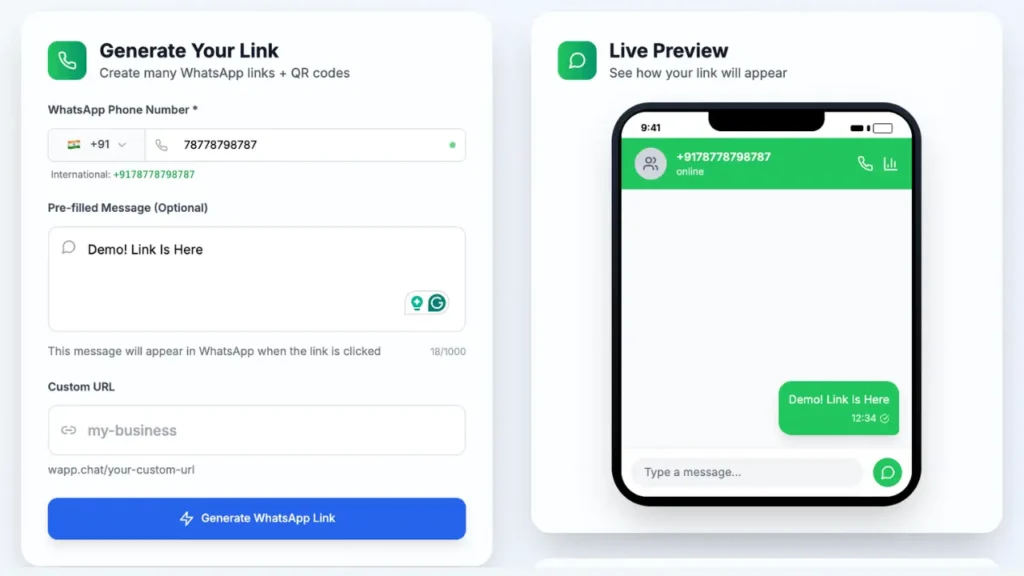
- Enter your WhatsApp phone number with the country code.
- Example:
+91XXXXXXXXXXfor India - Example:
+1XXXXXXXXXXfor USA
- Add a pre-filled message (optional).
- Example: Hello! I am interested in your product. Please share details.
- Click "Generate WhatsApp Link".
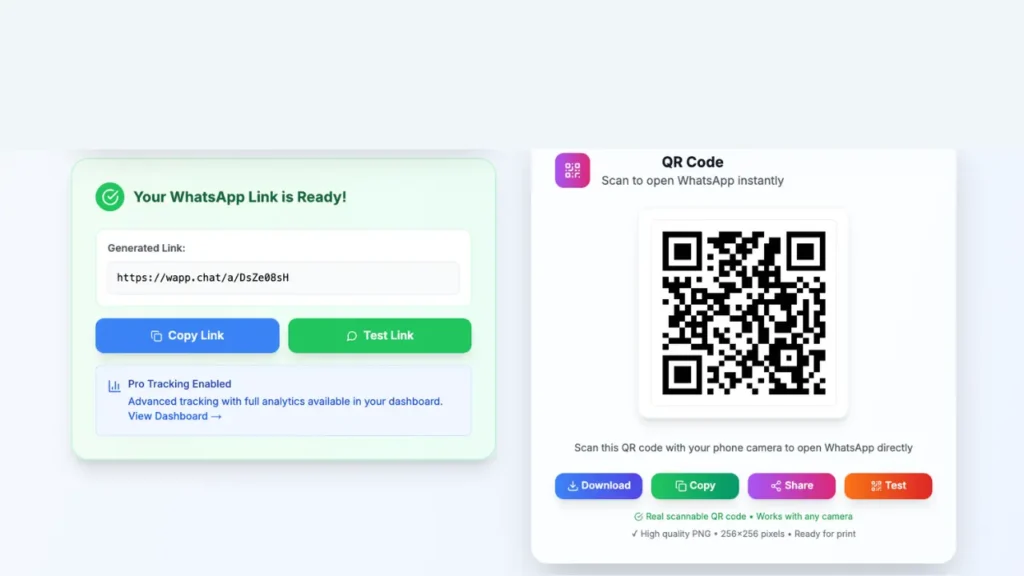
- Copy your link or download the QR code for sharing.
- Use the link anywhere — on websites, Social Media Profiles, email signatures, or printed materials.
Why Use WAppChat for WhatsApp Link Generation? #
Here's why WAppChat stands out from other tools:
- Fast link creation - Create a WhatsApp click-to-chat link without manually building the
wa.meformat. - QR code support - Turn the link into a scannable QR code for posters, packaging, shop counters, and events.
- Tracking options - Monitor performance for supported links and use analytics where your subscription or product access allows it.
- Flexible link types - Go beyond a basic WhatsApp link with custom links, catalog links, form links, and routing-based setups.
- Business discovery features - Use branded links and directory visibility features to make your business easier to find.
Benefits of WhatsApp Link Generation #
- Faster Communication: No need for customers to save your number first.
- More Conversions: Reduce friction for leads to contact you instantly.
- Professional Branding: Use pre-filled messages to greet customers with a branded tone.
- Easy Marketing Integration: Share links on Instagram, Facebook, LinkedIn, or even printed flyers.
Uses of WhatsApp Links in Different Industries #
WhatsApp links are useful in almost every business where people want a quick reply instead of a long form or delayed callback.
- Retail stores can place a WhatsApp link on product pages, flyers, or Google Business listings so shoppers can ask for price, stock, and delivery details instantly.
- Restaurants and cafes can use links for table bookings, menu requests, catering inquiries, and quick customer support without forcing people to download a separate app.
- Freelancers and agencies can share a branded WhatsApp link in proposals, email signatures, and bios so leads can ask questions at the exact moment they are interested.
- Real estate teams can use separate links for property visits, rental inquiries, and agent routing so prospects reach the right person faster.
- Clinics and service businesses can use WhatsApp links for appointment requests, pre-visit questions, and follow-up communication.
- Creators and coaches can share one-tap links in bios, newsletters, and communities to turn casual followers into direct conversations.
Tips for Creating Effective WhatsApp Links #
- Keep your pre-filled message short and clear.
- Use UTM parameters if tracking through Google Analytics.
- Combine your link with a call-to-action (CTA) button on your website.
- Create different links for different campaigns to measure performance.
Table: WAppChat Products and Access #
| Option | How access works | What you can do |
|---|---|---|
| Basic WhatsApp link generation | Available from the link generator flow | Create a click-to-chat link with an optional pre-filled message and share it anywhere |
| QR code sharing | Available with generated links | Download or share a QR code that opens the WhatsApp chat directly |
| Custom and catalog links | Purchased as Custom/Catalog bundles | Use branded URLs, catalog support, advanced analytics, QR code generation, and custom-domain capable setups |
| Form links | Purchased separately per form link | Collect structured customer details before the WhatsApp chat starts |
| Multi-agent routing | Purchased as MultiAgent packages | Route conversations across teams or agents with load balancing and agent-level analytics |
| Multilink pages | One free page is available when eligibility rules are met | Group multiple WhatsApp-related links into one page for easier sharing |
Frequently Asked Questions (FAQ) #
1. Can I create a WhatsApp link without WAppChat? #
Yes, but you will have to manually write the URL and encode your message. WAppChat automates this in one click.
2. Do I need to install an app? #
No. WAppChat works directly in your browser.
3. Is it free? #
You can start with the basic WhatsApp link generator, but advanced products in WAppChat are not all part of one flat free plan. Custom/catalog links, form links, and multi-agent routing use separate paid access models.
4. Can I share the link offline? #
Yes. Download the QR code and print it on flyers, business cards, or posters.
Conclusion #
WhatsApp link generation is one of the simplest yet most powerful tools to improve your communication with customers, clients, and leads. With WAppChat, you get a professional-grade link generator, free QR codes, smart tracking, and multiple pro features to help grow your business. If you are looking to scale your business further, check out our comprehensive guide on how to sell on WhatsApp.
If you haven't already, try creating your first link on WAppChat and see how easy it is to connect with your audience in just one click.
Written by
Sourabha Kumar Sahu
Founder of WAppChat, building tools that help businesses grow with WhatsApp.