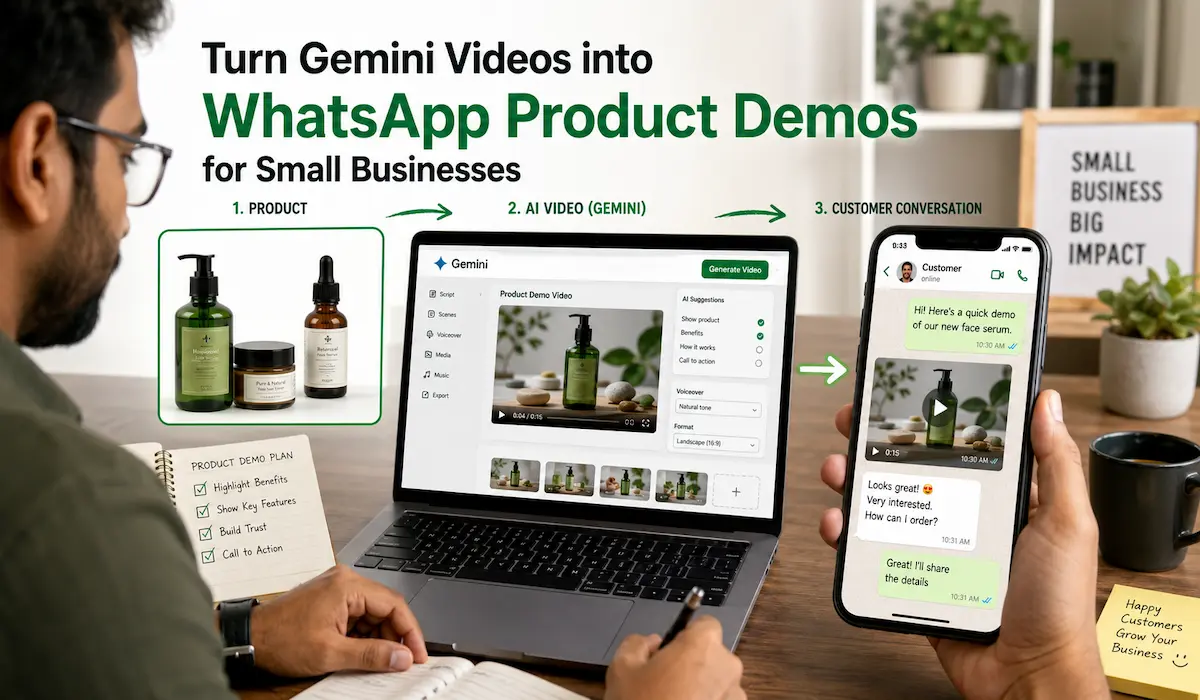
A customer asks how a dress looks while moving. Another wants to see how a machine works before asking for the price. Someone wants to order a cake, but just wants to understand the packaging before confirming the delivery.
These questions are difficult to answer through text alone. Photos help, but they may not show movement, scale, or the actual process. A short product video can explain the same point within a few seconds and give the customer something clear to respond to.
The problem is that many small businesses do not have a video team or enough time to record a new demonstration for every repeated question. Gemini can help create or edit short videos from text, images, and existing clips. Its current video tools also support repeated conversational edits and aspect-ratio selection, which makes it possible to refine a clip without starting again from the beginning.
The generated video is only one part of the process. Before it reaches a customer, the business still needs to check the product details, prepare the file for a phone screen, and decide what should happen after the customer watches it.
Quick Answer #
A small business can turn Gemini videos into WhatsApp product demos by starting with one common customer question. The business can collect accurate product photos, write a prompt around the question, and generate a short video that shows the relevant feature or process.
The final clip should be compared with the real product because AI-generated video may change colours, shapes, labels, or small details. Once the video is accurate, it can be trimmed, captioned, and sent through an active WhatsApp chat or connected to a keyword-based WApp.chat workflow.
The video should end with one clear next step, such as asking for the price, available colours, a size chart, or a personal demonstration.
A WhatsApp Demo Is Not the Same as an Advertisement #
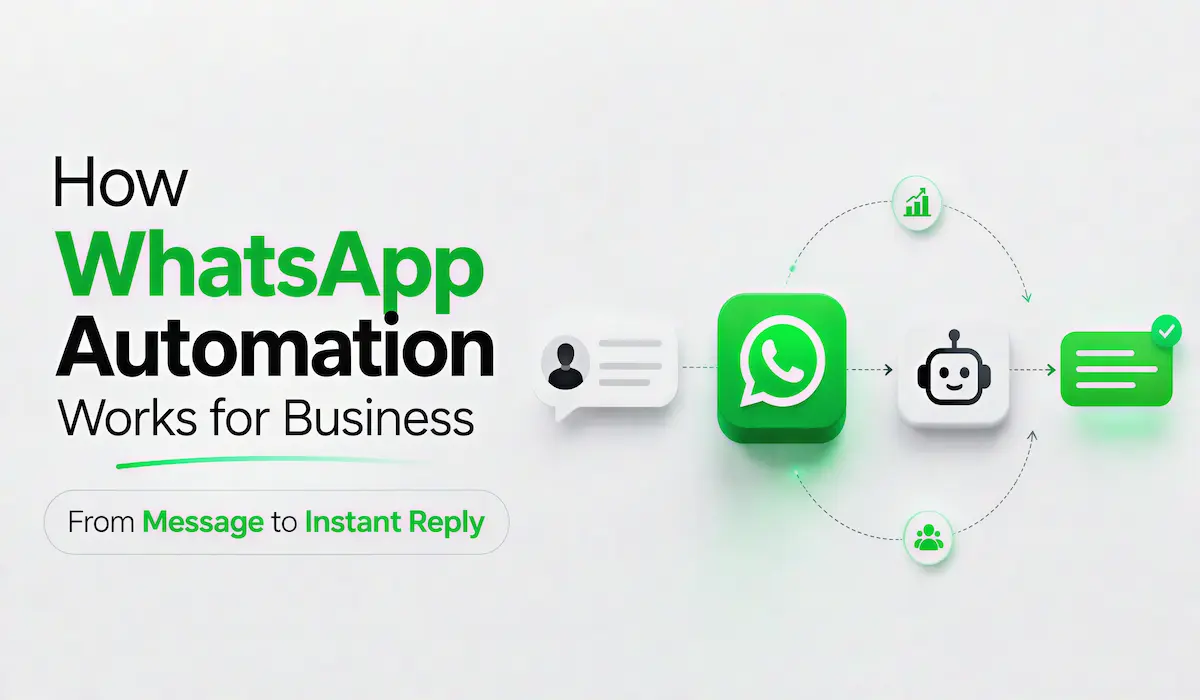
A social media advertisement usually tries to gain attention from people who may not know the product. A WhatsApp product demo reaches someone who has already shown interest and wants a specific answer.
That difference changes the purpose of the video. A public advertisement can focus on mood, lifestyle, or brand awareness. A WhatsApp demo needs to show something useful that moves the conversation forward.
A customer may ask:
- Will this bag hold a 15-inch laptop?
- How is this machine started?
- What does the cake look like inside the delivery box?
- What happens during this salon service?
The strongest video answers one of these questions directly. It does not need a long logo animation or a complete history of the business before showing the product.
WApp.chat already treats WhatsApp as a place where businesses answer repeated questions about prices, products, delivery, demos, and support. Its automation workflows can connect these questions to replies, tags, file requests, or human handoff.
| Social media advertisement | WhatsApp product demo |
|---|---|
| Tries to attract a broad audience | Answers an existing customer question |
| May focus on awareness or emotion | Should provide useful product proof |
| Usually ends by asking people to message | Continues a conversation that has already started |
| Can show several brand messages | Works best with one focused purpose |
Start With a Question Customers Already Ask #
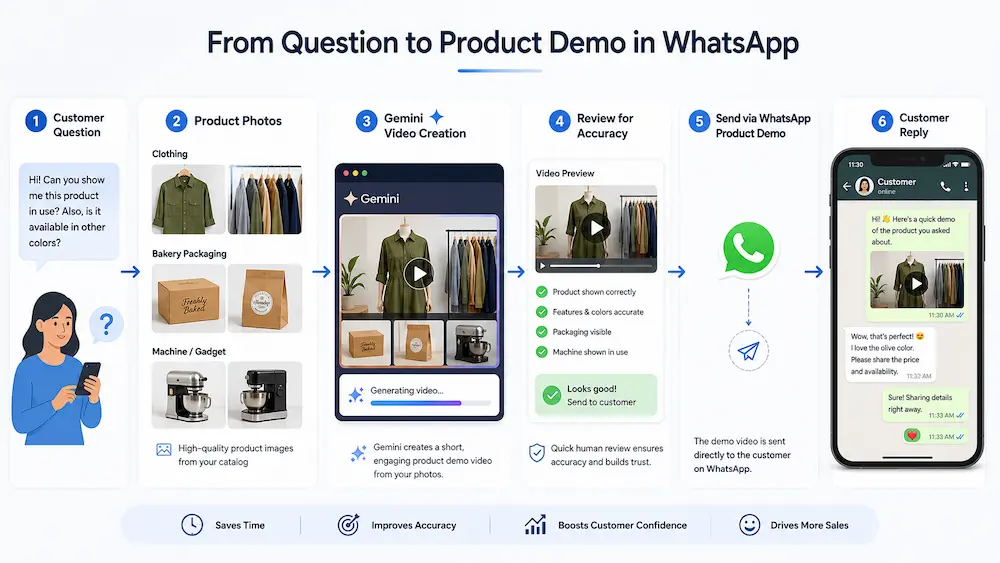
The first product demos should come from real customer conversations. A business owner does not need to guess what people want to see if the same questions already appear in WhatsApp every week.
A boutique may receive repeated questions about fabric movement or fitting. A machine seller may spend time explaining the operating process. A home baker may need to show packaging or portion size from different angles.
Go through recent conversations and note the questions that take the most time to answer. One useful demo can handle the first explanation while still leaving space for a personal reply.
Clothing and Boutique Products #
A customer may want to know whether the material is transparent, how the fabric falls, or what the back design looks like. A short movement-based clip can explain these details more clearly than four separate images.
The video should still represent the real item. If the generated version changes the sleeve pattern, print, or length, it should not be used as product proof.
Food and Home Businesses #
Food sellers can show how an order is packed, what one portion includes, or how the final item should be served. This helps the customer understand what they will receive instead of relying only on a styled photograph.
The video should not make the quantity appear larger or add decorations that are not included in the real order. A visually attractive clip loses its value when it creates the wrong expectation.
Machinery and Equipment #
A short demo can show the operating sequence, product movement or space needed around a machine. Buyers may use this information before asking for specifications or arranging a call.
Real footage should be preferred when safety, exact controls, or physical behaviour influence the buying decision. AI video should not invent buttons, operating steps, or results that do not exist.
Services and Digital Products #
A salon can show what happens during a service. A software business can demonstrate one feature. A consultant can explain the first stage of a process.
The purpose remains the same. The video should answer a real question instead of trying to explain the complete service in one clip.
A simple test helps here:
If the video cannot be described as the answer to one customer question, the topic is probably still too broad.
Decide Whether to Generate or Edit #
Gemini Omni can generate videos from prompts and references. It also supports video-to-video edits, multi-turn changes, and aspect-ratio control. Google currently allows one video and up to five images as references in supported Gemini video workflows.
That does not mean every product should be created entirely through AI.
A generated scene works well when the business needs a concept, lifestyle background, or visual introduction. A service business may use it to show a general situation without claiming that the scene is real customer footage.
Real footage is safer when exact details matter. This includes product controls, room dimensions, clothing colour, packaging, software screens, and before-and-after results.
The two methods can also work together. A business may record the real product and use Gemini to simplify the background or adjust the scene. This keeps the important product information connected to genuine footage while still reducing the amount of manual editing.
Collect Accurate Material Before Writing the Prompt #
A prompt works better when it is supported by clear and verified information. The business should prepare the product material before opening Gemini instead of trying to correct every missing detail later.
Start with clear photographs from different angles. Include close views of labels, buttons, patterns or packaging if those details matter to the customer.
Keep the verified product facts nearby. This may include dimensions, materials, available colours, package contents, and limitations. The prompt should follow these facts rather than add features that only make the video look attractive.
The language should also match the way customers speak. “Fits a 15-inch laptop” may be more useful than a technical capacity measurement inside a short sales demo.
Google requires users to have rights to the images and videos they upload. Its guidance also warns against violating copyright or privacy rights through generated content.
Plan the Demo Before Generating It #
A useful WhatsApp product demo can follow a simple flow:
- Show the situation or question.
- Introduce the product.
- Show the feature that answers the question.
- Give the customer a clear next action.
A boutique video may begin with a close view of the dress and quickly move to natural walking movement. The final caption can ask the customer to reply with their size.
A machinery demo may open with the real problem, show the operating process and end with an invitation to request specifications. The customer does not need a long cinematic opening because they already want information.
The main product should appear early. A short introduction is fine, but the viewer should not wait through several seconds of unrelated background footage before seeing the answer.
Write the Prompt Around the Product Truth #
A good prompt should describe both the desired result and the details that must not change.
Use a structure like this:
Create a [vertical or landscape] product demonstration for [type of customer]. Use the attached images as references for the exact product. Show [feature or action] so the viewer can understand [customer question]. Keep [important details] unchanged. Use [background and lighting]. Leave space for [captions or logo]. Do not add [features or objects that are not part of the real product].
Example for a Boutique #
Create a vertical mobile product demo using the attached photographs of this exact kurti. Show a natural front and side view with gentle walking movement so the customer can understand the fabric's fall. Keep the neckline, sleeve pattern, print, and length unchanged. Use a plain indoor background with soft daylight. Do not add pockets, embroidery, or accessories that are not visible in the reference images. Leave clear space near the bottom for a short caption.
Example for a Home Baker #
Create a short vertical product demo using the attached cake photographs. Begin with the closed delivery box, show the box opening, and finish with a close view of the actual decoration. Keep the colour, writing, size, and packaging accurate. Do not add toppings or decorative items that are not present in the references.
Negative instructions are useful because AI may otherwise add details that look natural but are not part of the real item. A small visual invention can become a serious problem when the customer treats the video as product proof.
Refine the Video Through Small Changes #
The first result may have the correct product, but the wrong background. The camera movement may feel too fast, or the ending may continue longer than needed.
Gemini Omni supports multi-turn editing, so these changes can be requested within the same conversation. Google lists object replacement, camera-angle changes, and scene modifications as supported examples.
Focused requests are easier to review:
- Keep the product unchanged and simplify the background.
- Reduce the camera movement.
- Move the product towards the centre.
- Keep the first scene and shorten the ending.
Several large changes inside one request can make the result difficult to judge. If the product suddenly looks different, it may not be clear which instruction caused the change.
The safer approach is to correct one important issue and compare the result with the previous version. Continue only when the product still matches the real item.
Run a Product Truth Check #
This is the most important stage before the video reaches WhatsApp.
Compare the final clip with the real product photographs or footage. Watch the full video because some changes appear only during movement.
Check the following details:
- Shape, size, and proportions
- Colour, material, and texture
- Buttons, labels, and controls
- Quantity and package contents
- Movement and operating behaviour
- Claims, prices, or visible text
A simple traffic-light system can make the decision easier.
| Result | What it means | What to do |
|---|---|---|
| Green | The product remains accurate | Continue to the final edit |
| Amber | A small background or styling issue appears | Correct it or explain it clearly |
| Red | A product feature has changed | Do not send the video |
A polished video should never receive priority over accuracy. Customers may forgive a simple background, but they may not forgive a product that looks different after delivery.
Prepare the Video for WhatsApp #
The customer will probably watch the video on a phone. That smaller screen changes what works.
Remove slow opening frames and show the product quickly. Keep captions short and avoid covering the exact detail the customer needs to inspect.
Audio should also work through a normal phone speaker. A voice that sounds clear through headphones may become difficult to understand when music and background noise compete on a smaller device.
Do not apply a heavy colour effect to products where shade matters. Clothing, cosmetics, food, and furniture can look very different after strong colour grading.
Complete the visual review before adding the final captions and logo. If an authorised Gemini clip contains a visible platform mark near the corner, a browser-based Gemini video watermark remover can help clean that area without forcing you to crop part of the product demonstration. Play the repaired section at normal speed before sending it because movement through the same area may reveal a small texture change.
This kind of cleanup should only be used on content that the business created or has permission to edit. It should not be used to remove another creator’s logo, copyright notice or ownership information.
Decide How to Deliver the Demo #
A video can be sent directly inside an active conversation when the customer has already asked for it. The message should explain what the video shows and what the customer should do next.
For example:
You asked whether this bag can hold a laptop. This short video shows the internal space of a 15-inch model. Reply COLOUR to see the available options.
The video may also be connected to a keyword-based workflow. WApp.chat can match terms such as price, demo, location or support and trigger a formatted reply, apply a tag or pass the chat to a team member.
A longer demo may work better through a hosted link. The customer can watch it without receiving a large file inside the chat. The right choice depends on the file, the conversation, and the amount of information being shown.
Product catalogues can support the next step. WApp.chat catalogue links allow businesses to share a short branded link and QR code that opens a WhatsApp Business product catalogue.
Give the Customer a Reason to Reply #
A product demo should not arrive as an unexplained attachment.
The accompanying message needs three things:
- Why the video is being sent
- What the customer should notice
- What they should reply
A useful message may say:
Here is the short video you requested. It shows how the fabric moves in natural light. Reply SIZE, and I will share the available measurements.
A weak message may only say:
Watch this amazing product video.
The first version continues the conversation. The second gives the customer no useful direction.
One clear reply action is usually enough. Asking the customer to check the price, choose a colour, book a call, and visit a website inside the same message creates unnecessary confusion.
Connect the Demo to a WApp.chat Workflow #
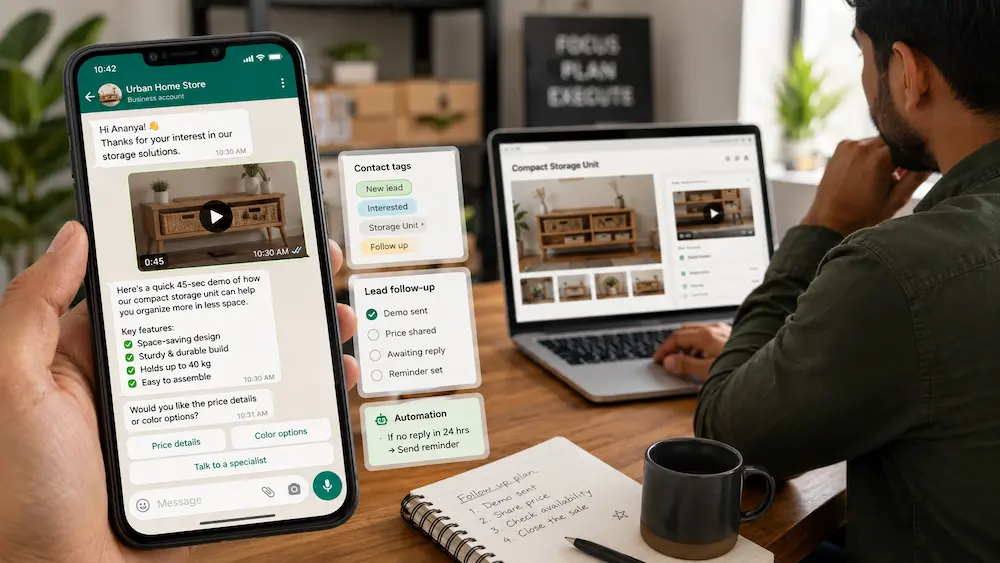
The customer may first reach the business through Instagram, a website, printed packaging or a QR code. WApp.chat can create branded links and QR codes for these entry points. Paid link tools can also provide click analytics.
A pre-filled message can tell the business what the customer wants before the conversation begins:
Hi, I want to see the video demo of Product A.
The workflow can look for a word such as DEMO, VIDEO, SIZE, or PRICE. It can send the appropriate reply, tag the lead, or hand the conversation to a person.
Some products need more context before the demo is sent. A WApp.chat form link can collect details such as product interest, budget, location, or enquiry type before WhatsApp opens.
Automation should handle the repeated part of the conversation. A human should take over when the customer asks about custom work, negotiation, safety, suitability, or any other question that requires judgment.
Match the Demo Flow to the Business #
A boutique may place a WhatsApp link in an Instagram bio. The customer types SIZE, receives a fabric movement video, and then asks for the measurement chart.
A restaurant may print a QR code on packaging. The customer scans it, types PACKING, and receives a short video that explains storage or serving instructions.
An equipment seller may collect the machine type and business size through a pre-chat form. The customer receives the relevant operating demo before a salesperson joins the conversation.
A salon may send a short service-process video when someone types RESULT. The workflow can continue with preparation instructions or a booking link.
The same system can work for software. A visitor clicks “Ask on WhatsApp,” requests a demo, and receives a short clip showing one feature before choosing a trial or call.
Follow Up According to Customer Intent #
Not every person needs the same follow-up.
Someone who watches the video but asks nothing may need a gentle question:
Was there any part of the product you wanted to see more closely?
A customer asking about size or compatibility needs accurate supporting information. Another asking for the price or delivery date may already be close to making a decision.
Complex enquiries should move to a person. Automation should not guess when the answer depends on product safety, custom pricing, or individual suitability.
WApp.chat supports lead tags, contact history, and handoff workflows, which can help businesses separate pricing leads, product questions, and support cases.
Measure Whether the Video Helps #
Video views alone do not tell the business whether the demo answered the question.
Track what happened after the customer received it:
- Did the customer reply?
- What did they ask next?
- Did the original doubt continue?
- Did they request the price or availability?
- Did the conversation need a human handoff?
- Did anyone complain that the product looked different?
Branded links and QR-code analytics can help identify which entry points start conversations. WApp.chat also encourages businesses to review conversations and improve keyword coverage over time.
The business can use these findings to decide which demos need correction and which customer questions deserve a new video.
Mistakes That Reduce Customer Trust #
Showing an Inaccurate Product #
The AI version may make the product look larger, brighter, or more polished than it is. The video should not be used when those changes can affect the buying decision.
Trying to Explain Everything #
One long video with every feature, offer, and brand message may overwhelm the customer. A focused clip normally answers the question more clearly.
Sending the Video Without Context #
The customer may not know what to watch or why the clip is relevant. A short accompanying message solves this problem.
Adding Too Much Text #
A phone screen has limited space. Large text blocks can hide the product and make the video difficult to follow.
Reusing the Wrong Demo #
A general promotional video may not answer a customer asking about size, movement or operation. Reuse works only when the customer question is genuinely the same.
Automating a Question That Needs Judgment #
A workflow should not provide a confident answer about safety, medical suitability or custom product fit without human review.
Respect Consent, Copyright, and AI Disclosure #
Use only source material that the business owns or has permission to upload. Consent is also needed before using a real person’s face, voice, or private footage.
The customer should not be led to believe that a conceptual AI scene is real product footage. Disclose the use of AI where the generated setting, movement, or result could influence the buying decision.
Google uses SynthID to embed imperceptible watermarks in AI-generated video and other media. Google explains that these signals can support the identification of content created or edited by its AI tools.
WhatsApp campaigns also need proper consent. WApp.chat describes its official Cloud API workflows as using approved templates and the 24-hour customer service window for business messaging.
Final Gemini-to-WhatsApp Checklist #
Before sending the video, confirm that:
- It answers one real customer question.
- The product details remain accurate.
- The product appears early.
- The text is readable on a phone.
- The audio works through a phone speaker.
- Visual cleanup was authorised.
- The message explains what to notice.
- One clear reply action is included.
- The correct WApp.chat trigger or link is connected.
- A person can take over when needed.
- Consent and disclosure requirements are covered.
- The original product material remains saved.
Final Takeaway #
The best Gemini product demo is not always the one with the most dramatic scene or polished effect. It is the video that answers a real customer question without changing the truth about the product.
Gemini can help small businesses create and refine visuals. WhatsApp brings the video into a direct customer conversation. WApp.chat can connect the entry point, automated reply, lead tag, and human follow-up.
When these parts work together, one short video can save repeated explanations and help the customer make a better decision. The product remains the centre of the conversation, while AI and automation support the process around it.
Frequently Asked Questions #
Can I create a Gemini product video from photographs? #
Yes. Gemini Omni supports image references for video generation. The final video still needs to be compared with the real product because the generated movement may change small details, text or proportions.
Should I use real footage or an AI-generated demo? #
Use real footage when exact appearance, controls, dimensions, or physical behaviour affect the buying decision. AI-generated scenes work well for concepts, backgrounds, and illustrations where the customer is not being shown false product proof.
What should a WhatsApp product demo show? #
It should answer one common customer question. This may involve fit, movement, packaging, operation, size or what happens during a service.
Can WApp.chat send a product demo automatically? #
WApp.chat can connect keyword-based messages to replies, tags, file requests, and handoff workflows through its WhatsApp automation system. The setup should still respect customer consent and the service window.
What message should I send with the video? #
Explain why the video is relevant, what the customer should notice, and what they should reply. Avoid sending a file without context.
Can I use the same demo for every customer? #
The same video can be reused when people ask the same question. A different concern may require another clip or a personal reply.
How can I stop Gemini from changing the product? #
Use clear reference images and state which details must remain unchanged. Add instructions that prevent Gemini from inventing colours, labels, controls, or accessories. Compare the complete result with the real item before sending it.
Should an AI product video be disclosed? #
Yes, where a customer could reasonably assume that the generated scene is genuine footage. Disclosure is especially important when the background, movement, or result was created rather than recorded.
Written by
Sourabha Kumar Sahu
Founder of WAppChat, building tools that help businesses grow with WhatsApp.