You must have noticed how group chats become confusing when everyone starts sending different replies at the same time. One person says yes. Another says no. Someone else suggests a different option. Then what happens is the whole conversation gets messy and you are not able to take a clear decision.
Now here's the thing. WhatsApp has already solved this problem by adding a poll feature. Instead of sending multiple messages, you can just create a poll and let people vote. That’s how decisions become faster and cleaner.
In this guide, you will understand how to create a poll on WhatsApp step by step. You will also learn how it works and how you can use it in a better way.
What is a WhatsApp Poll and Why You Should Use It #
A WhatsApp poll is a built-in feature where you can ask a question and give multiple options. People can select their choice by voting.
The main thing is that everything stays inside the chat. You do not need any external tool or link.
There are many benefits of using polls:
- You can take quick decisions in groups
- You avoid message clutter
- You get clear results instantly
- You save time in discussions
For example, if you are planning a trip with friends, instead of asking everyone one by one, you can create a poll with options like Rio de Janeiro, São Paulo, or Salvador. That’s how you get the answer quickly.
Requirements Before Creating a Poll #
Before you start, you need to check a few things.
First of all, your WhatsApp should be updated to the latest version. If you are using an old version, the poll option may not show.
The feature works on Android, iPhone, WhatsApp Web, and Desktop. It also works in both personal chats and group chats.
So if your app is updated, you are ready to go.
How to Create a Poll on WhatsApp #
Now let us go step by step. You can follow this on your phone easily.
Create Poll on Android #
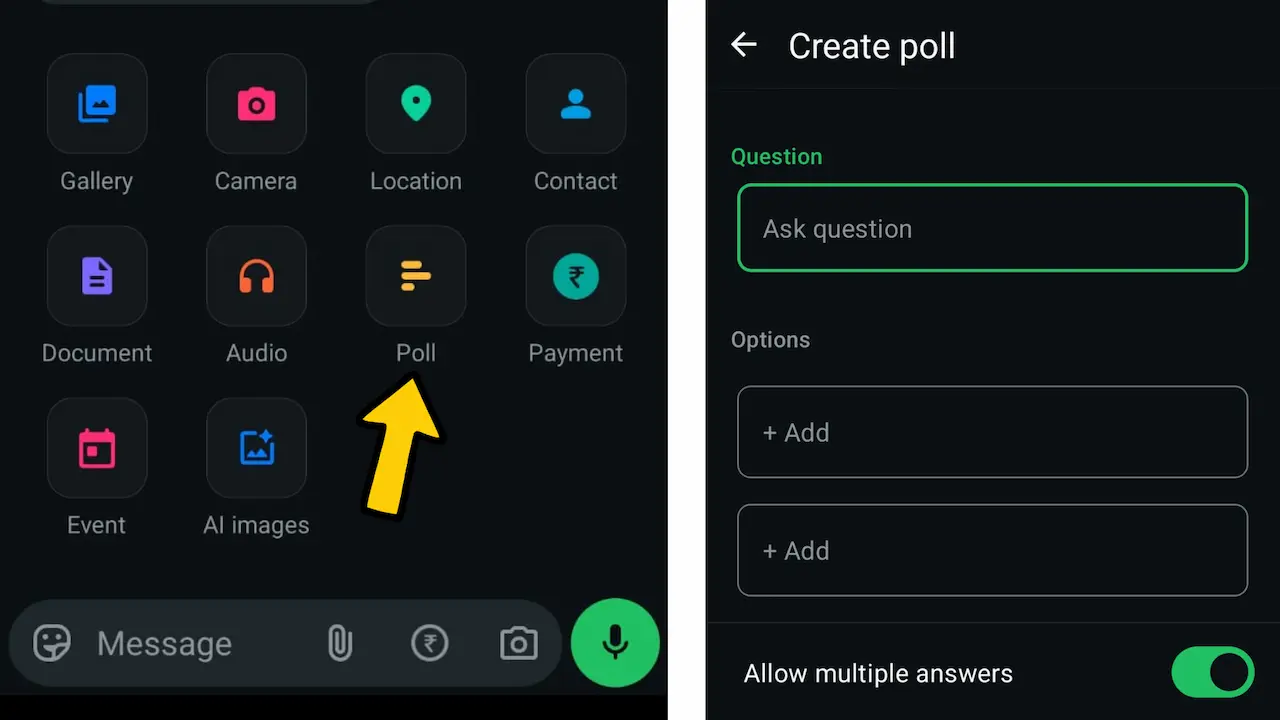
- Open WhatsApp and go to the chat or group where you want to create the poll.
- Tap on the attachment icon which looks like a paperclip.
- Tap on the poll option. Now you can enter your question. Below that, you can add multiple options.
- Once you do that, tap on send. Your poll will be visible in the chat.
Create Poll on iPhone or WhatsApp Web or Desktop #
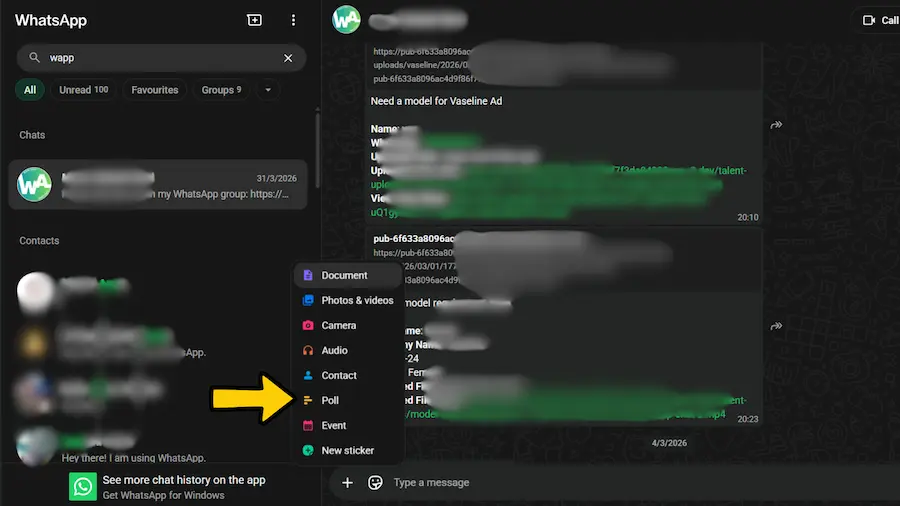
- If you are using an iPhone or Desktop version, open the chat first.
- Then tap on the plus icon.
- You will see the Poll option.
- Tap on it. Add your question and options. After that, send the poll.
That’s how it works across all devices.
Important Settings While Creating Poll #
When you create a poll, there are a few settings you should not ignore.
One important option is multiple answers. If you turn this on, people can select more than one option. If you turn it off, they can choose only one.
You can also arrange your options in order. This helps in making the poll more clear.
There is also a limit of options. You can add up to 12 choices in a single poll.
One thing you need to understand is that once you send the poll, you cannot edit it. So make sure everything is correct before sending.
How to Check Poll Results #
To check results, open the poll inside the chat. You will see how many votes each option has received.
If you tap on view votes, you can see who voted for which option. This gives full clarity.
This is very useful when you want to track responses in groups or teams. For strategies on engaging group members, see our guide on WhatsApp group marketing.
How to Delete or Manage a Poll #
If you want to remove a poll, you can long press the poll message and tap delete.
Right now, there is no option to officially close or end a poll. So if you need a new decision, you have to create a new poll.
That’s how the system works for now.
WhatsApp Poll Limitations #
Although polls are useful, there are some limits you should know. You cannot edit a poll after sending it. So mistakes cannot be fixed. There are no advanced analytics. You only see basic results.
In that case, using a tool like WAppChat makes more sense. You can create WhatsApp form links where someone clicks it, fills details first, and then starts chatting. That’s how you get better and organized responses compared to a basic poll.
You can add only up to 12 options. There is no scheduling option. You cannot set a poll for later. Because of these reasons, polls work best for quick decisions but not for detailed data collection.
Conclusion #
So now you know how to create a poll on WhatsApp and how it works in real use.
The thing is very clear here. If you want fast decisions inside chat, polls are perfect. They reduce confusion and save time.
But when you need more structured input, you should look for better ways like form based WhatsApp links. That’s how you take things to the next level.
You can try this on your own phone once and see how quickly it works.
Written by
Sourabha Kumar Sahu
Founder of WAppChat, building tools that help businesses grow with WhatsApp.