Have you ever felt that someone else is reading your WhatsApp messages without your knowledge, or you suddenly notice messages marked as read even though you did not open them, and now you are thinking what is really going on with your account and how to check it properly.
The thing is very clear here, WhatsApp now allows multiple devices to stay connected at the same time, because of which your chats can be accessed from other devices if they are linked. That’s why checking this part is very important if you care about your privacy and your personal chats.
What Linked Devices Mean in WhatsApp #
Now here’s the thing, WhatsApp has a feature where you can connect your account to other devices like a laptop or another phone by scanning a QR code, and once that is done those devices can access your chats without needing your phone every time.
You already know this if you have used WhatsApp Web before, but the thing is that this feature can also create problems if someone else links your account without you noticing.
These linked devices can be different types such as:
- WhatsApp Web in a browser
- WhatsApp Desktop app
- Another mobile device
Once connected, these devices stay logged in and keep syncing your messages, which means someone can read your chats from there.
How to Check If Your WhatsApp Is Linked to Another Device #
What you need to understand is this, WhatsApp already gives you a direct way to check all connected devices, and you do not need any extra app for this.
On Android #
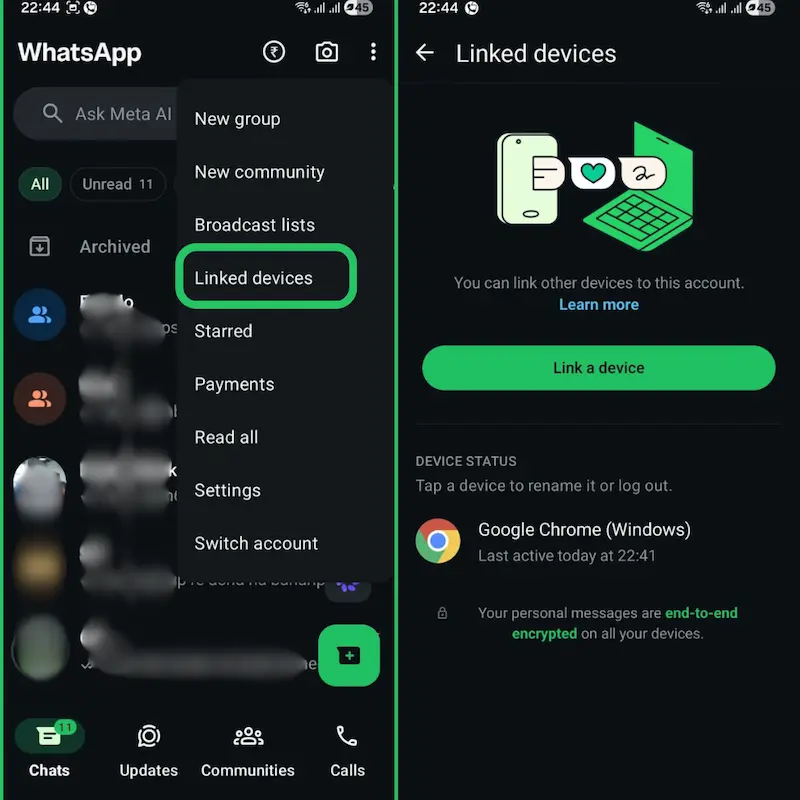
You can open WhatsApp, tap the three dots at the top, then go to “Linked Devices”, and from there you will see all the devices connected to your account.
On iPhone #
You can open WhatsApp, go to Settings, then tap on “Linked Devices”, and the full list will appear in front of you.
Once you reach here, you will see device names and last active time, which helps you understand what is happening.
How to Understand the Linked Devices List #
Now this is where most people get confused, because they see device names but do not know what is normal and what is risky. The thing is that if you see your own laptop or your usual browser, then it is fine, but if you notice any unknown device or something that you do not remember connecting, then you should not ignore it.
You might see details like:
- Device type like Chrome or Windows PC
- Last active time
The point is simple here, WhatsApp does not show exact location, so you have to depend on device name and activity to judge the situation.
Signs That Someone Else Is Using Your WhatsApp #
You might think it’s not needed to check again and again, but wait, this matters a lot because there are small signs that can tell you something is wrong.
One thing you can notice is unknown linked devices, which you never added, and that is the biggest red flag. Another thing is messages getting marked as read even when you did not open them, which means someone else may be viewing your chats.
Sometimes you may also see messages sent from your account that you never typed, and this is a clear sign that your account is being used somewhere else. In addition to this, WhatsApp may ask for verification or OTP suddenly, which also shows that someone is trying to access your account.
How to Remove Unknown Devices Immediately #
Now let us come to the solution part, because just checking is not enough, you should also know how to fix it quickly.
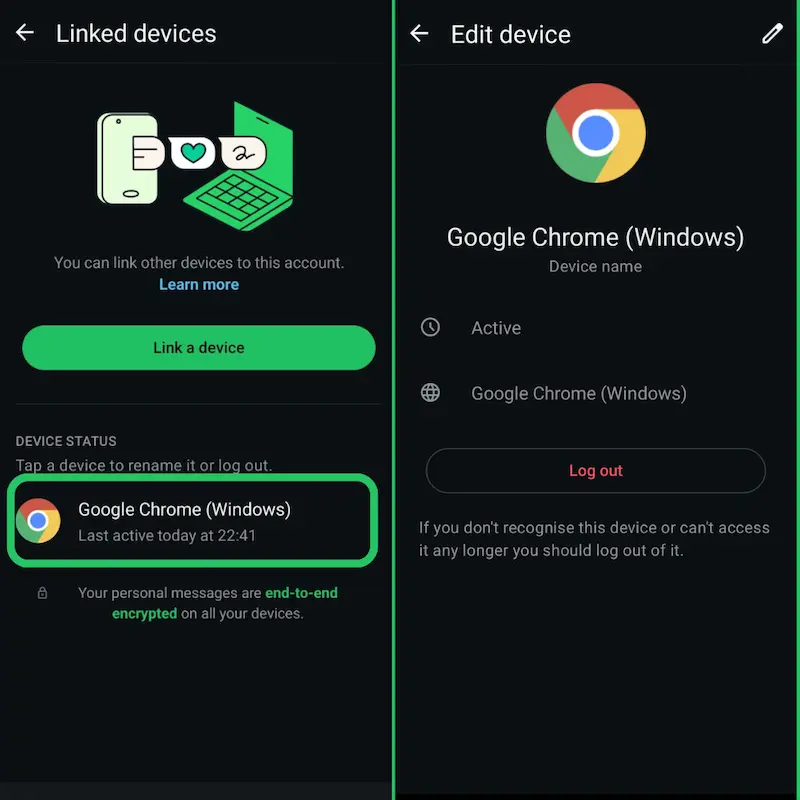
If you find any suspicious device, you can tap on that device inside the Linked Devices section and log it out directly. That’s how it works, and the access will be removed instantly.
If you are not sure which device is risky, then you can log out from all devices at once, which clears everything and gives you a fresh start.
What to Do If You Still Suspect Unauthorized Access #
Sometimes this works better when you take extra steps, because logging out alone may not be enough if your account is already exposed.
You can restart your phone and reinstall WhatsApp to reset everything properly. In addition to this, you should check if there are any unknown apps installed on your phone, because sometimes hidden apps can create problems.
You should also make sure your SIM card is safe and not used by anyone else, because that can also affect your account security.
How to Secure Your WhatsApp Account #
Now here comes the important part, where you protect your account so that this problem does not happen again.
Enable Two-Step Verification #
You should turn on two-step verification, because it adds a PIN layer and blocks unauthorized access even if someone tries to log in.
Never Share OTP #
You already know this, but still many people make this mistake, and once you share OTP, your account can be accessed easily.
Avoid Scanning Unknown QR Codes #
This is where most people go wrong, because they scan QR codes without thinking, and that is how attackers link their device to your account.
Keep WhatsApp Updated #
You should always keep the app updated, because updates fix security issues and improve protection.
Can Someone Link Your WhatsApp Without You Knowing? #
The thing is that normally someone needs access to your phone to scan the QR code, but there are cases where people get tricked into scanning fake QR codes or clicking harmful links, and that’s how their account gets linked without realizing it.
That’s why awareness matters a lot, because most attacks happen due to small mistakes and not technical hacks.
Common Myths About WhatsApp Access #
Many people think that someone can hack WhatsApp easily without any access, but it is not like that. Most of the time, access happens through OTP or QR code.
Another myth is that you can see the exact location of the linked device, but that is not possible, because WhatsApp only shows device details and activity time.
One More Thing You Should Know #
Sometimes you may want to save important chats or keep a record for safety, and in such cases you can convert your chats into a document using a tool like csv to pdf, which helps you store everything in a clean format that you can access later without any changes.
If you are looking for creating advanced multi-agent business flows or WhatsApp form links, consider a tool like WAppChat to manage and distribute responses.
Conclusion #
At the end, the main thing is that checking linked devices is not difficult, but ignoring it can create serious problems. You should make it a habit to check your linked devices regularly and remove anything that looks suspicious.
That’s how it is, once you stay aware and follow these steps, your WhatsApp account stays in your control and your chats remain private.
Written by
Sourabha Kumar Sahu
Founder of WAppChat, building tools that help businesses grow with WhatsApp.