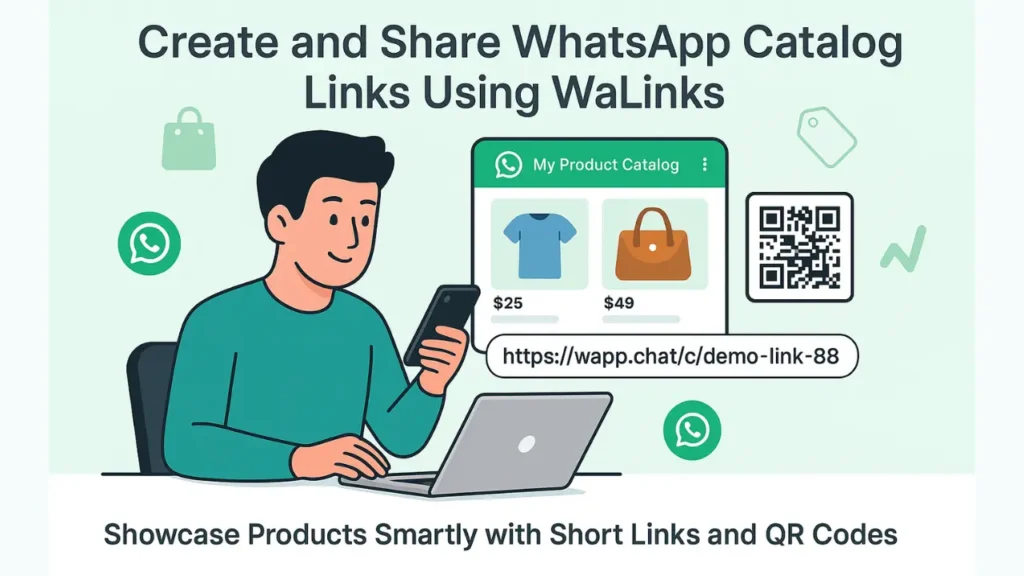
If you run a business on WhatsApp, you probably know how hard it is to share your full product catalog without sending long links or messy media.
Customers often ask for photos or prices, and you end up forwarding the same messages again and again. The Catalog Link feature in WAppChat makes this much easier.
With this feature, you can create a short, branded link that opens your WhatsApp Business Catalog instantly. You can even share it with a QR code, making your product catalog easy to access for anyone, anywhere.
What Is a Catalog Link in WAppChat #
A Catalog Link is a short, customized link that connects directly to your WhatsApp Business product catalog. It helps you showcase all your products or services in one clean view without sharing long URLs.
For example, instead of using a long default catalog link, you can share something like https://wapp.chat/c/demo-link-88
When customers click it, they directly see your product listings with prices, photos, and descriptions inside WhatsApp. It's a faster and smarter way to display your catalog.
Why Businesses Should Use Catalog Links #
Every business that sells through WhatsApp can use this feature to save time and improve sales flow. Here's why it matters:
1. Share Your Products Professionally: Your products appear under one short link with your business name. It gives a professional look and makes it easy for customers to browse.
2. Save Time in Repeated Chats: Instead of sending product photos and descriptions separately to every new customer, you can share one link that shows everything at once.
3. Track Clicks and Performance: WAppChat records every click on your catalog link. You can view which catalog gets more visits, helping you understand what customers are interested in.
4. Use QR Codes for Offline Promotions: Every catalog link automatically generates a QR code. You can print it on menus, posters, flyers, or packaging. Customers scan it and see your catalog instantly.
5. Works for Any Type of Business: You can use Catalog Links for clothing stores, restaurants, electronics shops, gift stores, or any business with a WhatsApp catalog.
Who Can Use This Feature #
This feature is made for small and medium businesses that already use WhatsApp Business Catalogs. It works best for:
- E-commerce sellers sharing collections
- Restaurants showing food menus
- Boutiques displaying new arrivals
- Home businesses listing handmade products
- Local stores promoting deals or seasonal sales
Even freelancers offering digital products or services can use catalog links to share pricing in one click.
How to Create a Catalog Link in WAppChat #
Creating a Catalog Link inside WAppChat takes less than two minutes. You can follow these steps on your dashboard.
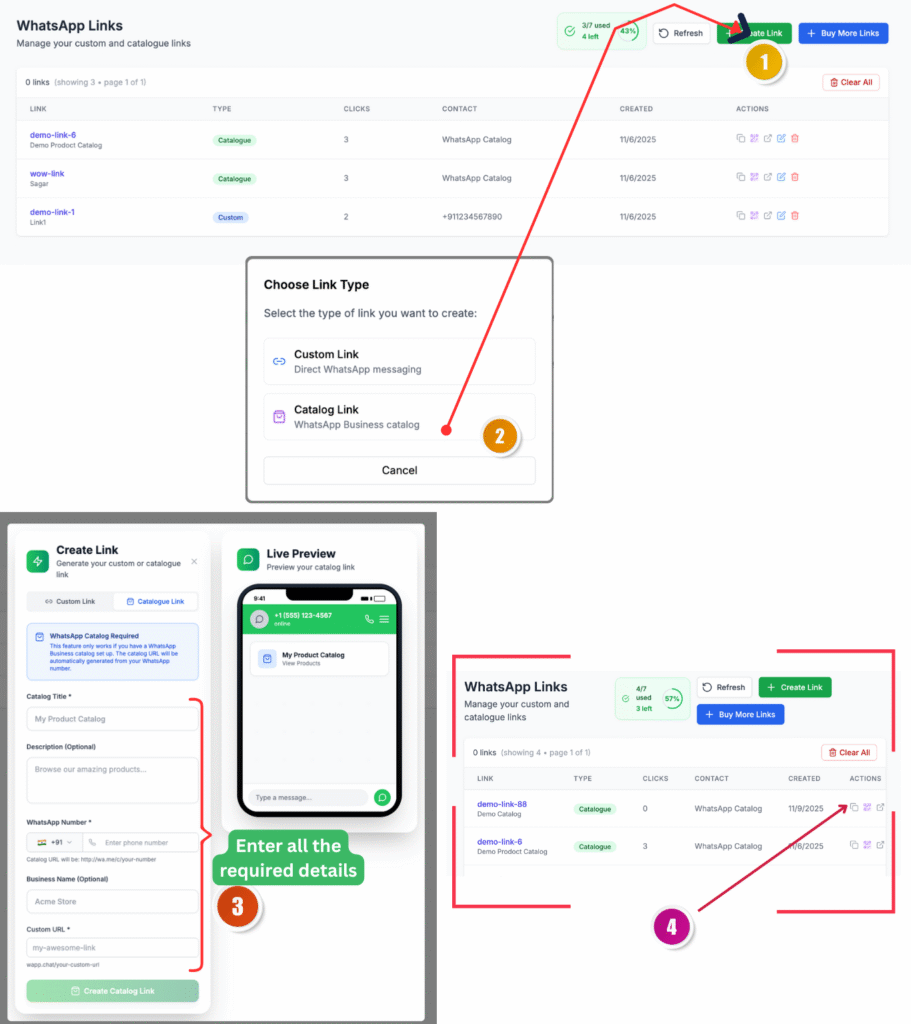
Step 1: Go to WhatsApp Links #
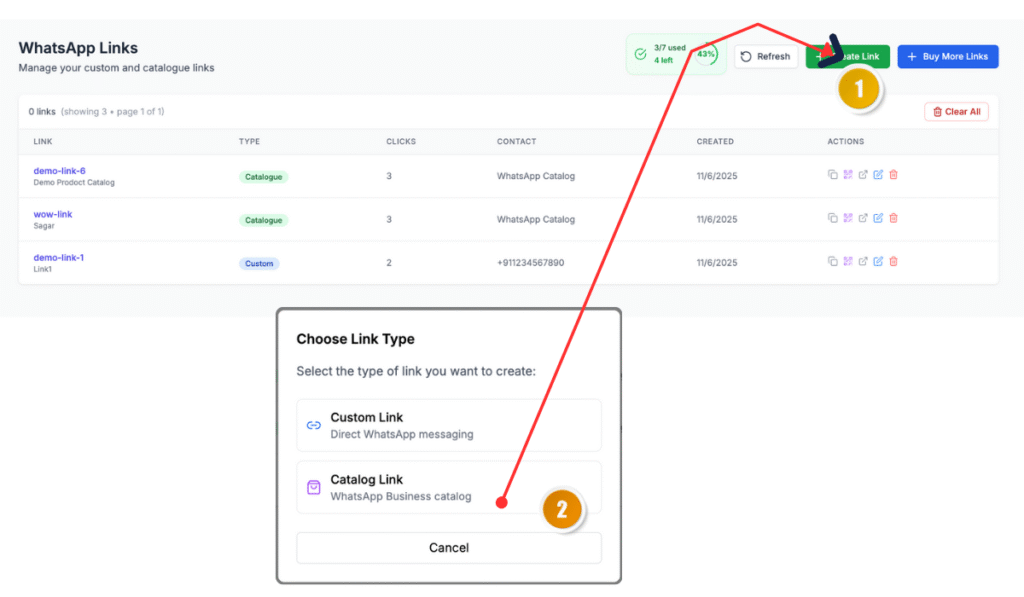
Click on WhatsApp Links in your WAppChat dashboard. You'll see a table showing all existing links with their type, clicks, and contact details. Click the Create Link button on the top right to start.
Step 2: Select Catalog Link #
A pop-up appears asking you to select a link type. Choose Catalog Link. This option connects your WhatsApp Business catalog to your custom short link.
Step 3: Fill in the Required Details #
In the setup section, fill in all the fields carefully.
- Catalog Title: Add the name of your catalog, for example My Product Catalog or Summer Menu.
- Description: Write a short line about what the catalog contains.
- WhatsApp Number: Enter your business number linked with your catalog.
- Business Name: Add your store or brand name (optional).
- Custom URL: Set your preferred short link name like demo-link-88. If it's unavailable, try a new one.
You can also see a Live Preview on the right showing how your catalog will appear to customers inside WhatsApp.
Step 4: Create the Link #
After entering all details, click Create Catalog Link. WAppChat instantly generates your link and displays it on the dashboard. You can also copy it, test it, or download the QR code right away.
Step 5: Manage and Share #
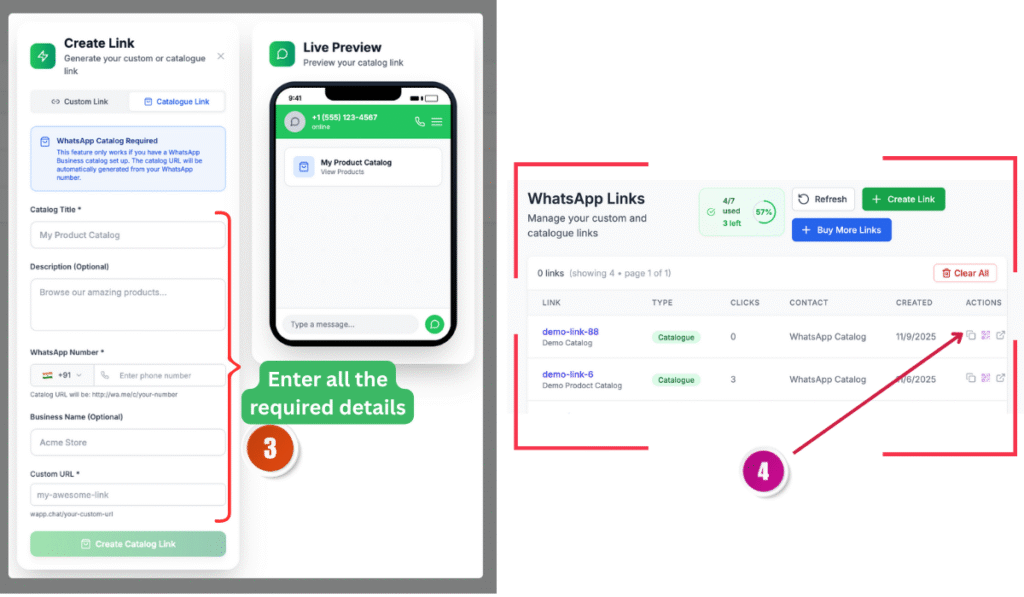
All your created catalog links appear in the same list with information like link type, clicks, and created date. You can copy them anytime, update names, or delete old ones.
Now your link is ready to share anywhere: on social media, ads, websites, or printed materials.
How to Use the QR Code for Catalog Links #
Every Catalog Link in WAppChat comes with an auto-generated QR code. You can:
- Download it as a high-quality image for printing
- Use it on product labels, posters, or packaging
- Add it to menus in restaurants or café counters
- Share it on social media or your website for faster access
When someone scans it, it opens your WhatsApp catalog directly. They can browse, message you, or even place an order right away.
Real Use Cases for Catalog Links #
Here are a few practical examples of how different businesses use this feature daily.
- A fashion boutique shares its link on Instagram stories for new product drops.
- A restaurant prints the QR code on its tables for digital menu browsing.
- A gift store adds the link to its Google Business profile for easy customer access.
- A grocery shop shares the link in local WhatsApp groups to show offers and daily deals.
- A digital artist uses it to display digital prints and pricing.
No matter what you sell, this link helps you share your catalog without clutter.
How Catalog Links Save Time and Money #
Before this feature, businesses had to send catalog items manually or rely on long URLs that looked confusing. With WAppChat, you spend less time repeating the same steps.
If you also share large product media, PDF brochures, or lookbooks alongside your catalog, using a tool like Media2URL allows you to convert media files into direct shareable links without overloading customer chats with bulky attachments.
The short links and QR codes make it simple to promote your catalog everywhere without extra tools.
It also cuts marketing costs because you no longer need third-party URL shorteners or custom QR generators. Everything is already inside your WAppChat dashboard.
Tips to Use Catalog Links Effectively #
- Keep your catalog title clear and short
- Update your WhatsApp Business catalog regularly
- Share your link in ads, bios, and WhatsApp groups
- Use the QR code in your store or on your packaging
- Track clicks weekly to see what works best
Why This Feature Matters for Businesses #
Catalog Links make product discovery on WhatsApp effortless. Instead of wasting time explaining every item, you give customers a full view of your products in one click.
It creates a smoother buying process and makes your brand look professional. For small and growing businesses, this is one of the easiest ways to turn WhatsApp into a product showroom that works day and night.
Checklist #
- Go to WhatsApp Links
- Click Create Link
- Select Catalog Link
- Fill in all required details
- Create and save your link
- Copy or download the QR code
- Share it with your customers
Final Thought #
The Catalog Link feature in WAppChat gives your business a clean and modern way to display products on WhatsApp.
It saves time, reduces effort, and gives your customers a simple link to explore what you sell anytime. Whether you run an online shop or a local store, this one feature can make your product sharing faster and more effective.
Written by
Sourabha Kumar Sahu
Founder of WAppChat, building tools that help businesses grow with WhatsApp.