
When you build a network on WhatsApp using WappChat, it feels great to share the tool that saves you time. The Wapp Chat Refer and Earn program is designed for exactly that.
It rewards you when your friends or colleagues join the platform using your referral link. The best part is that you get credits you can use for free WhatsApp links or extra agent slots.
What Is the Refer and Earn Feature in Wapp Chat #
The Refer and Earn section is your personal reward dashboard. It lets you share your referral code with others. When someone signs up and makes their first purchase, you earn one credit.
These credits can be used later to unlock new features or upgrade your existing plan without spending money.
You can find this section in the left sidebar of your dashboard under Refer & Earn. Once you open it, you will see your full referral summary and the steps to get started.
How to Access and Understand the Referral Dashboard #
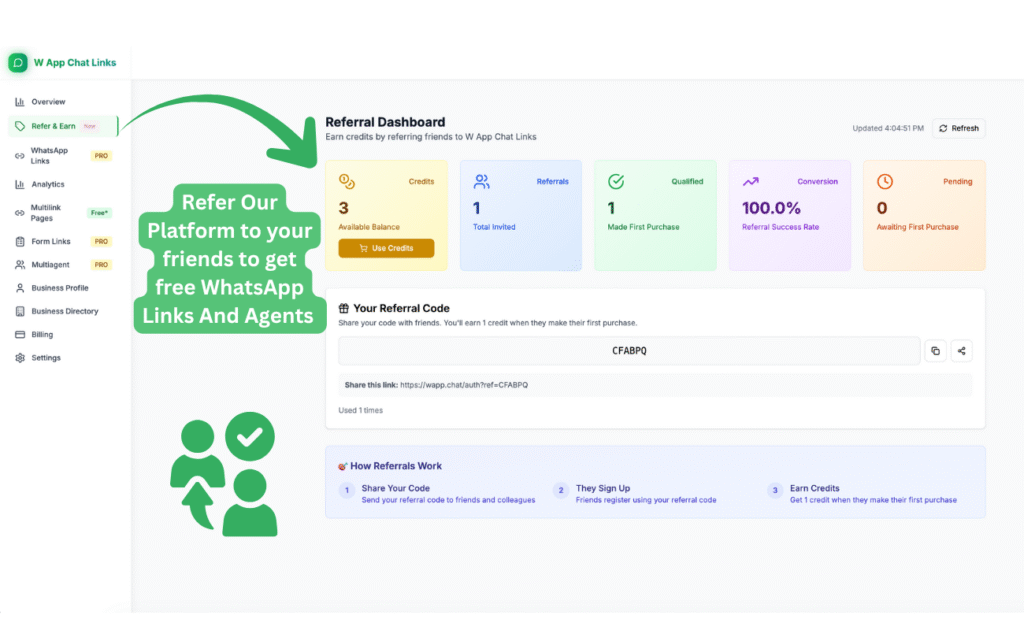
The Referral Dashboard is simple to use and shows you all the details you need at one glance.
1. Credits Balance: At the top left, you'll see how many referral credits you currently have. This is the amount you can spend on new WhatsApp links or additional agent slots.
2. Total Invited: This shows how many people have joined WappChat using your code. It helps you track how many signups came from your invitations.
3. Qualified Referrals: Out of all the people you invited, this number shows how many made their first purchase. Only qualified referrals generate credits.
4. Conversion Rate: The conversion rate tells you the success percentage of your referrals. It shows how many sign-ups actually turned into active customers.
5. Pending Referrals: This shows the count of users who have signed up but have not yet made their first purchase. Once they do, your credits will increase automatically.
Each card on the dashboard is color-coded to make it easy to read. The system updates these numbers in real time.
How to Share Your Referral Code #
You will find your personal referral code and link in the Your Referral Code box. It usually looks like this: https://wapp.chat/auth?ref=CFABPQ
This is your direct invite link. Anyone who signs up using this link will be added to your referral list.
Steps to Share Your Referral Code #
- Copy your referral link from the dashboard.
- Send it to your friends, clients, or team members who use WhatsApp for business.
- They register on WappChat using your link.
- When they make their first purchase, you earn a credit automatically.
You can share your referral link anywhere such as:
- WhatsApp groups
- Business communities
- Social media
- Email newsletters
- Blog pages or websites
There is no limit on how many people you can refer. The more people you bring, the more rewards you earn.
How to Use Your Earned Credits #
Credits work like coins inside WappChat. You can redeem them for free WhatsApp Links, Multilink Pages, or even extra agent seats for your team.
To use them:
- Go to the Refer & Earn page.
- Click Use Credits on the top left.
- Select what you want to redeem, such as new link slots or agent upgrades.
- Confirm your selection.
Your credits will be applied instantly and you will see the update in your account usage limits.
Who Can Benefit Most from the Referral Program #
This program is useful for anyone who regularly uses WhatsApp for marketing, support, or communication. It works best for:
- Small businesses that want to expand without extra cost.
- Marketing agencies who use WappChat to manage clients.
- Freelancers who recommend tools to others.
- Influencers in WhatsApp or Telegram communities.
If you already have an audience or clients using WhatsApp, this feature becomes a quick and easy way to earn platform benefits without spending.
Real Example of How It Works #
Imagine you use WappChat to manage customer chats for your online store. You refer three business owners in your contact list using your referral link.
Out of the three, one purchases a premium plan to get more custom links. You instantly earn one credit.
Later, you use that credit to create another custom WhatsApp link for your next campaign. No payment needed.
If all three friends buy later, your total credits become three, which you can use to activate more agent slots for your growing team. That's how your account grows faster without paying extra.
How This Program Saves You Money #
Each new WhatsApp link or agent slot usually costs credits or a small payment. By referring your friends, you replace cash payments with earned credits. Over time, this can save a significant amount if you are active on the platform.
It also encourages organic growth. You build a network of businesses that use the same tool, which helps everyone communicate better. That creates a long-term benefit beyond just earning credits.
Tips to Increase Your Referral Success #
You can make the most out of this feature with a few simple habits.
- Share your referral link in professional groups or forums where businesses talk about WhatsApp marketing.
- Add your referral link in your WhatsApp or Instagram bio.
- When you post tutorials or reviews about WappChat, include your code.
- Follow up with friends who sign up but haven't purchased yet.
- Always explain that they get the same benefits and you both gain.
It works best when your referrals understand how WappChat improves their communication. A short message about how you use the platform can motivate others to try it.
Common Questions About the Referral System #
1. Do credits expire? #
No, the credits you earn stay in your account. You can use them anytime for upgrades or new link purchases.
2. Can I track who used my referral link? #
Yes, the dashboard shows how many users signed up and who qualified for credits.
3. What happens if someone signs up but never purchases? #
They will appear under the "Pending" list. Once they make their first purchase, you automatically get the reward.
4. How much can I earn? #
There is no limit. You can invite as many users as you want.
Why This Feature Matters for Businesses #
The Refer and Earn feature is not just about rewards. It builds a strong network of verified users who use the same tool for WhatsApp communication. You not only earn credits but also promote a platform that supports small businesses and agencies.
When your connections join using your link, you are creating a shared ecosystem where everyone benefits. You earn credits, they get an easy tool to manage their chats, and the community grows stronger together.
Checklist #
- Go to the Refer & Earn page
- Copy your referral link
- Share it with friends and clients
- Track sign-ups and qualified purchases
- Redeem earned credits for new links or agents
Final Thought #
The WappChat Refer and Earn program is the smartest way to expand your WhatsApp tools without paying more.
You can invite your network, earn credits automatically, and use those credits to grow your business setup inside WappChat. It is a simple reward system that pays you back for sharing something genuinely useful.
Written by
Sourabha Kumar Sahu
Founder of WApp Chat, building tools that help businesses grow with WhatsApp.